f in

Testers HUB AI

AI Test Management Platform for Manual & Regression QA

Move from requirements to reviewed test coverage, manual execution, defects, retesting, regression and release reporting in one connected QA workflow.

Available through managed Testers HUB QA engagements. Broader product access is being evaluated.

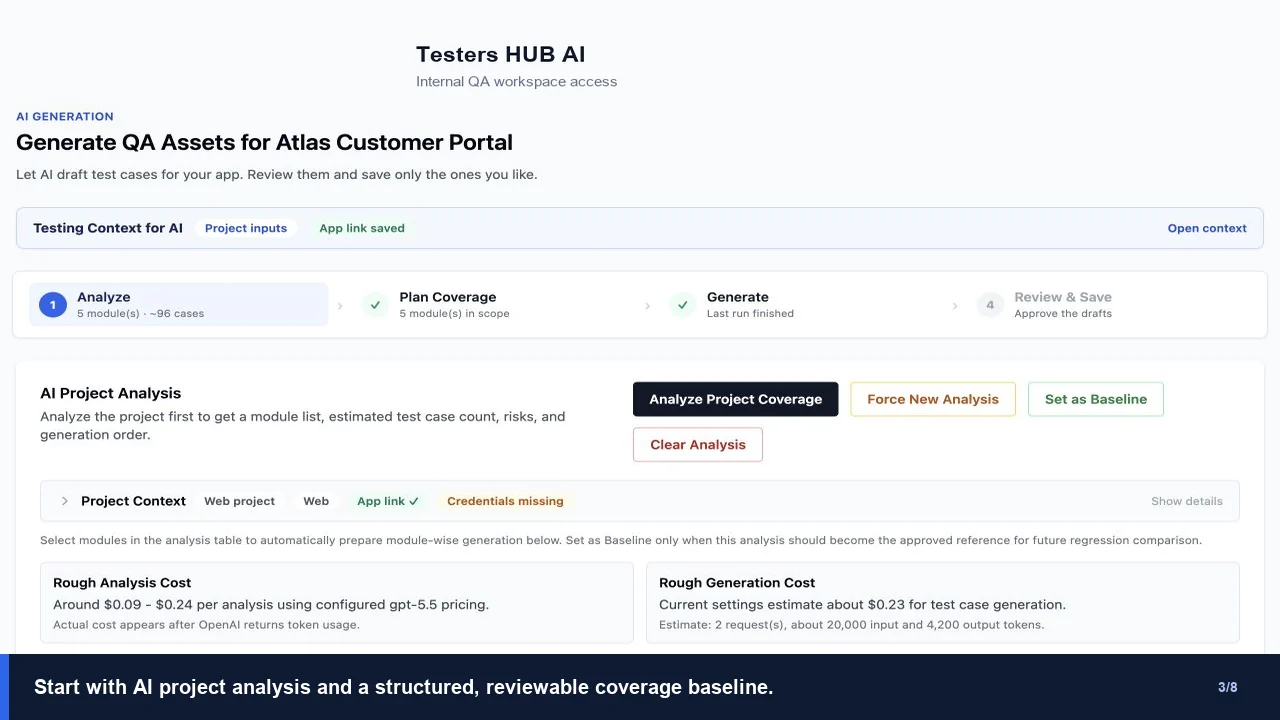
Testers HUB AI project analysis and test coverage planning screen
Available nowWebsite and web-app QA
Available nowAndroid and iOS QA workflows
Human reviewedAI drafts require QA approval
Coming soonExpanded automation support

AI-assisted planning. Human-led delivery.

From Requirements to Regression Coverage

Turn your requirements into an actionable manual regression plan with Testers HUB. AI helps draft and organize coverage; QA engineers review the business rules, execute approved tests and maintain the suite as your product changes.

  1. 01 · INPUT

    Share the product context

    Provide your website/app, user stories, designs or requirements. Agree the critical journeys, roles, environments and release scope with QA.

  2. 02 · AI DRAFT

    Generate initial coverage

    AI-assisted test case generation organizes modules and suggests scenarios or a checklist with steps and expected results. Treat assumptions as questions to resolve.

  3. 03 · QA REVIEW

    Approve a practical plan

    QA validates business logic, removes duplicates, adds missing risks and confirms priorities, test data and browser/device coverage before execution.

  4. 04 · MANUAL EXECUTION

    Test the real workflows

    Engineers execute approved cases and explore adjacent risks. Record Pass, Fail, Blocked, Hold or Not Run with environment details and observations.

  5. 05 · DEFECT EVIDENCE

    Report reproducible issues

    Connect failures to test cases with reproduction steps, expected vs actual behavior, severity and screenshots or other useful evidence.

  6. 06 · REGRESSION UPDATES

    Retest and maintain coverage

    Verify fixes, add cases for confirmed failures and update affected journeys after changes. Report execution status and open risks for release decisions.

What AI handles vs. what QA engineers handle

AI output is a draft. Human review determines whether the coverage is relevant and ready to run.

AI assistance

Organize and suggest

  • Group requirements into modules and workflows.
  • Suggest positive, negative and obvious missing scenarios.
  • Draft consistent steps and expected results from the supplied context.
  • Help structure reusable regression suites for human approval.

QA ownership

Validate and execute

  • Confirm business rules and challenge unsupported assumptions.
  • Review edge cases, usability and cross-role/data behavior.
  • Select and test agreed real devices and browsers.
  • Execute tests, document defects, verify fixes and review release risk.

Illustrative SaaS example · not a client result

From a feature brief to a testable release plan

Suppose a SaaS release includes onboarding, paid subscriptions, admin/member roles and notifications. The following shows a possible initial draft and the questions a QA engineer would resolve before execution.

Onboarding

Initial draft: Sign up, verify email and complete the first-run setup.

QA adds: Expired or reused invitation links, interrupted setup and session expiry. Confirm recovery behavior with the product owner.

Payments

Initial draft: Select a plan, complete checkout and confirm access.

QA adds: Failed payments, repeated submission and delayed payment confirmation. Agree the expected subscription state and use approved test payment data.

Roles

Initial draft: Check admin and member permissions.

QA adds: Direct-link access, role changes during an active session and cross-workspace data visibility. Turn the approved permission rules into a role matrix.

Notifications

Initial draft: Trigger an event and check that a notification arrives.

QA adds: Recipient and preference rules, duplicate or delayed delivery, and links opened by signed-out users. Check layout and interactions on agreed browsers/devices.

Ready for execution: Each approved case needs a requirement or risk, preconditions, test data, steps, expected results, priority and environment. Unresolved rules remain flagged; after execution, confirmed defects and product changes inform the next regression cycle.

Explore the workflow and evidence

Working capabilities

See the product workflow, not generic AI promises.

Current screens show real Testers HUB AI functionality. We label roadmap items separately and do not publish unmeasured speed or quality claims.

AI-assisted project analysis and test coverage screen in Testers HUB AI

AI-assisted test design

Analyze product context before generating cases.

Review modules, risks and estimated coverage, then approve only the drafts that fit the real product workflow.

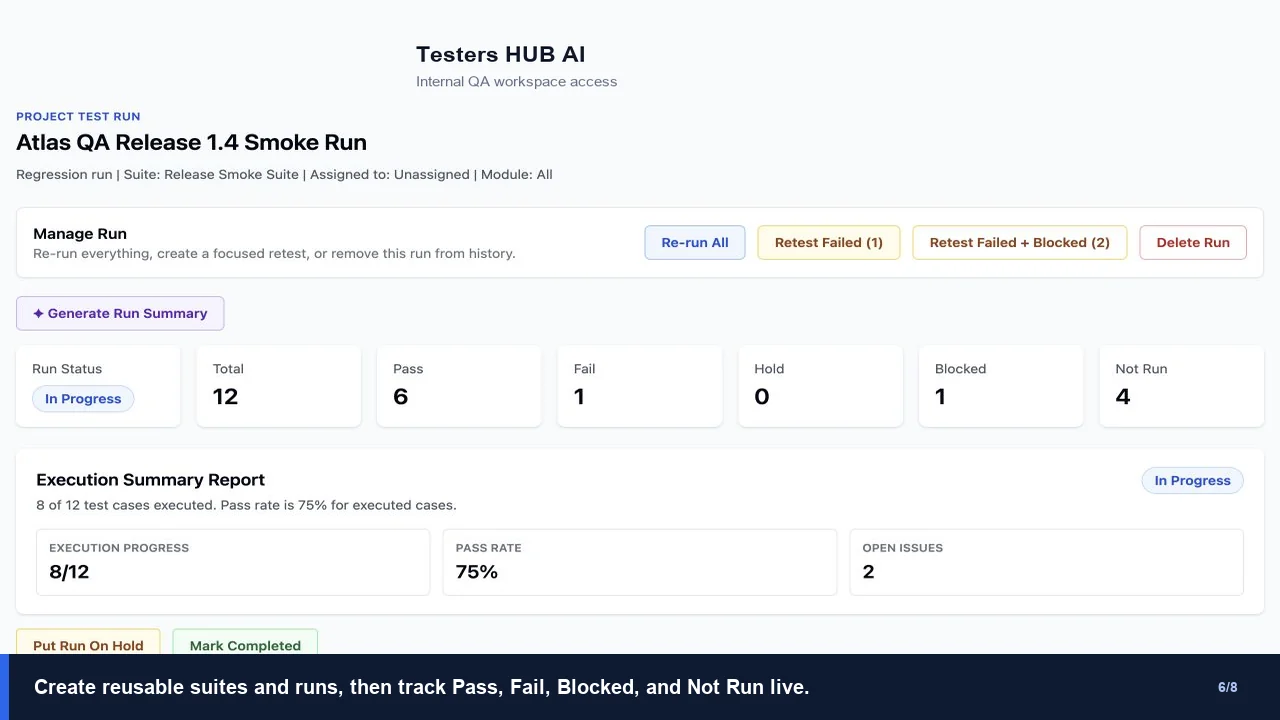
Manual test execution and QA summary screen in Testers HUB AI

Manual execution and reporting

Track runs, failures, blocked cases and retesting.

Create reusable suites, monitor live execution status and generate evidence-led summaries for product decisions.

One connected workspace

Test management beyond case generation.

01

Project Dashboard

Organize projects, modules, test suites, runs and current QA status.

02

AI Test Case Management

Draft coverage from approved requirements, then review and save useful cases.

03

Manual Execution

Record Pass, Fail, Blocked, Hold and Not Run states with practical notes.

04

Defects & Evidence

Connect issues to cases with steps, severity, screenshots and status.

05

Retesting

Verify fixes, reopen unresolved defects and retain an auditable history.

06

Regression Planning

Reuse approved coverage around critical paths, changes and prior failures.

07

QA Reporting

Summarize execution progress, open risks and release readiness.

Roadmap

Automation Support

Expanded automation assistance is in development and is not presented as available today.

Product evidence

We are measuring AI output quality before publishing performance claims.

Our controlled benchmark records approved drafts, QA edits, rejected or duplicate scenarios, missing cases added by testers, draft time, review time and final approved coverage.

Results will be published only after the underlying evidence is complete and reviewable.

Frequently asked questions

About Testers HUB AI.

Is Testers HUB AI only an AI test case generator?

No. It connects AI-assisted test design with human approval, manual execution, defects, retesting, regression planning and QA reporting.

Can clients access their Testers HUB AI project?

Yes. Approved client, product, development and QA stakeholders can receive secure access to follow test cases, execution progress, defects, evidence and summaries during a managed QA engagement.

Does Testers HUB AI replace experienced QA testers?

No. AI accelerates analysis and drafting. Experienced testers review product context, approve coverage, execute workflows, document evidence and make release recommendations.

What product information can the platform use?

A project can begin from a website or web application URL, mobile build, PRD, BRD, Figma design, user stories or other approved requirements and workflow documentation.

Is automation available?

Expanded automation support is on the roadmap. Current working capabilities focus on AI-assisted test design, human review, manual execution, defects, retesting, regression organization and reporting.

Early product access

Help shape Testers HUB AI around a real QA workflow.

Tell us how your team manages requirements, cases, execution, defects and regression. We will review the fit for a managed pilot or early product evaluation.

  • Secure project access for approved stakeholders
  • Website, web-app, Android and iOS workflows
  • AI-assisted drafting with experienced QA review
  • No unmeasured speed or quality promises