A startup recently approached us after receiving several negative reviews on Google Play.
The strange part?
The app had already been tested extensively.
Internally, everything looked stable.
The team had tested on:
- Samsung Galaxy S24
- Samsung Galaxy A54
- Samsung Galaxy S23
No major issues appeared.
The app launched successfully.
Then the reviews started arriving.
Some users reported:
- camera issues
- app crashes
- broken login flows
- notification problems
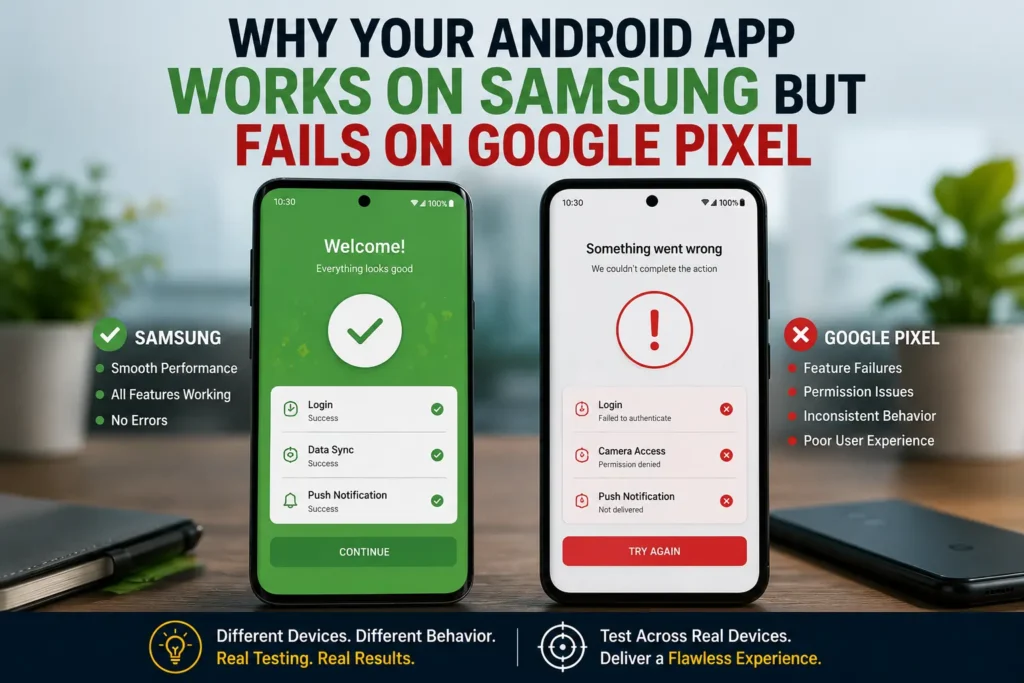
After investigating further, a pattern emerged.
Almost every complaint came from Google Pixel users.
The app wasn’t broken on Samsung devices.
It was failing on Google Pixel.
And this is one of the most common issues we encounter during Android app testing services projects.

Launching an Android App Soon?
Identify hidden compatibility issues before your users do.
The Android Testing Challenge Most Teams Underestimate
Many developers assume:
Android is Android.
In reality, Android devices behave differently depending on:
- manufacturer customizations
- operating system versions
- hardware configurations
- permission handling
- background process management
An app that performs perfectly on Samsung devices may behave completely differently on Google Pixel.
That’s why real device testing remains one of the most important parts of modern mobile app testing services.
What Happened During Testing?
After receiving user complaints, we expanded testing to multiple Pixel devices.
Within hours, we found issues that had never appeared on Samsung phones.
Examples included:
- camera permission failures
- notification inconsistencies
- UI rendering differences
- background process interruptions
The app technically worked.
However, the user experience was noticeably different.
And unfortunately, users don’t care why something fails.
They simply blame the app.
1. Permission Handling Behaves Differently
One of the first issues involved camera permissions.
On Samsung devices:
- permissions were requested correctly
- camera access worked normally
On Pixel devices running newer Android versions:
- permission prompts appeared differently
- some workflows failed after denial
- users became stuck in onboarding
Internally, the team never noticed because testing focused primarily on Samsung devices.
This is why Android compatibility testing is so important before release.
2. Google Pixel Gets Android Updates First
Many developers forget that Google Pixel devices often receive Android updates before most manufacturers.
That means Pixel users are frequently running newer Android versions earlier than Samsung users.
This creates challenges such as:
- API behavior changes
- permission updates
- security restrictions
- background service limitations
We frequently see issues appear on Pixel devices months before they appear elsewhere.
By the time the broader Android ecosystem catches up, negative reviews have already accumulated.
3. Background Process Management Can Affect App Behavior
Another issue involved push notifications.
Internally, notification testing passed successfully.
However, Pixel users reported:
- delayed notifications
- missed alerts
- inconsistent delivery
After investigation, we discovered that background processing behavior was impacting notification workflows differently.
The notification service itself wasn’t broken.
The app simply wasn’t handling certain scenarios correctly on Pixel devices.
These are exactly the kinds of issues that real-device mobile app testing helps uncover.
4. UI Rendering Differences Still Exist
Many teams believe responsive layouts solve all screen-related problems.
Unfortunately, that’s not always true.
During testing, we identified:
- overlapping elements
- cut-off text
- spacing inconsistencies
- keyboard overlap issues
that only appeared on specific Pixel models.
The app looked perfect on Samsung.
The same screens appeared broken on Pixel.
This is why relying on a small collection of test devices often creates blind spots.
5. Performance Can Vary Across Devices
Even when hardware specifications look similar, performance can vary significantly.
During one testing cycle, we observed:
- slower screen transitions
- delayed rendering
- increased memory usage
on Pixel devices compared to Samsung phones.
Nothing crashed.
However, the experience felt less polished.
And users notice performance friction immediately.
Especially during:
- onboarding
- payments
- account creation
- media uploads
Small delays often become negative reviews.
Need Real Device Coverage?
Test across Samsung, Google Pixel, Xiaomi, OnePlus, and other Android devices.
Why Developers Miss These Problems
The answer is simple.
Most teams test using the devices they already own.
A typical startup may have:
- one Samsung phone
- one iPhone
- one tablet
Everything works.
The release proceeds.
Then real users introduce hundreds of device combinations that were never tested.
This isn’t a development problem.
It’s a testing coverage problem.
What We Commonly Find During Android Compatibility Testing
Across many Android app testing services projects, we repeatedly discover:
Permission Flow Issues
Apps fail after users deny permissions.
Notification Problems
Push notifications behave differently across devices.
Camera and Media Bugs
Media uploads fail under specific conditions.
UI Layout Problems
Screens appear differently across manufacturers.
Performance Variations
Apps feel slower on certain devices.
Many of these issues never appear during simulator testing.
Why Real Device Testing Matters
Emulators are useful.
Internal testing is useful.
However, neither replaces testing on real devices.
Professional mobile app testing services typically validate applications across:
- Samsung devices
- Google Pixel devices
- OnePlus devices
- Xiaomi phones
- tablets
- multiple Android versions
This broader coverage helps identify issues before users encounter them.
And that’s often the difference between a successful launch and a flood of negative reviews.
The Cost of Missing Device-Specific Bugs
Many startups spend thousands on:
- development
- marketing
- app store optimization
- paid acquisition
Then lose users because of problems that only affect a subset of devices.
The frustrating part?
Those issues are often preventable.
A few hours of proper Android compatibility testing can uncover problems that would otherwise impact thousands of users.
Improve App Store Ratings Before Launch
Professional mobile app testing services help uncover device-specific issues before they affect users.
Final Thoughts
If your Android app works perfectly on Samsung devices, that’s a good start.
But it doesn’t guarantee success across the Android ecosystem.
Google Pixel devices often expose issues involving:
- permissions
- notifications
- UI rendering
- Android version changes
- performance behavior
before other manufacturers do.
That’s why successful app launches rely on more than internal testing.
They rely on real-device validation.
Because users don’t care whether the problem is device-specific.
They only care whether your app works.
Frequently Asked Questions
Why does an app work on Samsung but fail on Google Pixel?
Different Android versions, manufacturer customizations, permissions, and hardware behaviors can create device-specific issues.
Are Google Pixel devices important for app testing?
Yes. Pixel devices often receive Android updates first, making them critical for compatibility testing.
Can emulators identify Pixel-specific bugs?
Not always. Many permission, performance, and hardware-related issues only appear on real devices.
What is Android compatibility testing?
Android compatibility testing verifies that an app works correctly across different Android devices, manufacturers, and OS versions.