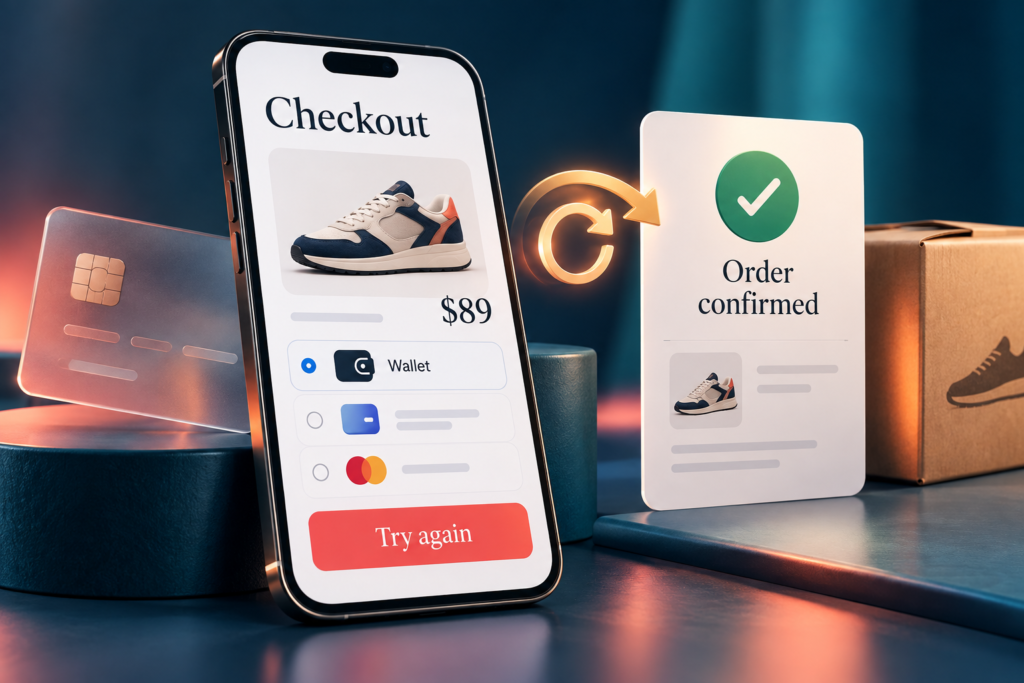
A payment success screen is not enough to prove checkout works. The cart total, payment status, order record and fulfillment handoff must agree—even when shoppers retry, leave authentication or switch devices.
This checkout testing checklist is for store owners, developers and QA teams validating an existing buying journey. For a scoped engagement across your store’s supported platforms and payment methods, explore our eCommerce testing services.
What should be tested in an eCommerce checkout?
Test the complete purchase state: selected products, final price, discounts, tax, shipping, payment authorization or capture, order creation and confirmation. Include failure, pending and recovery paths on the browsers and devices your shoppers use—not only a successful card transaction.
Set up a safe, useful checkout test
Agree the payment methods, markets, browsers, real devices, business rules and expected order states before execution. Use staging, approved test accounts and provider test credentials. Prevent test orders from reaching real fulfillment. Do not use real customer payment details; any necessary live verification requires separate merchant approval and a controlled plan.
Record the build, environment, browser/device, cart contents, amount, currency, test payment reference, order reference and relevant event timestamps. Redact secrets and personal data from screenshots and logs. A functional pass is not a security assessment or proof of peak-load capacity.
15 checkout QA scenarios and their expected results
These are recommended test cases, not claims that every defect occurred in a Testers HUB project. Adapt expected outcomes to your payment integration and approved business rules.
1. Price, tax and shipping recalculation
Test: Change quantity, shipping address and delivery method between product, cart and checkout screens.
Expected: The final total follows approved pricing rules and matches the amount sent for payment; any change is shown before authorization.
2. Discount validity and refresh
Test: Try valid, expired, ineligible and conflicting coupons; refresh and navigate back.
Expected: Eligibility and stacking rules remain consistent, with clear errors and no silent loss of an accepted offer.
3. Decline followed by retry
Test: Use provider test data to decline a payment, then retry with a successful method.
Expected: The first attempt remains failed and the later success creates the intended order without duplicate payment or lost cart data.
4. Repeated submission and uncertain responses
Test: Double-tap Pay, refresh or interrupt the response after submission using approved test controls.
Expected: Replayed requests do not create duplicate charges or orders. A timeout is treated as an uncertain state until the payment status is reconciled.
5. Interrupted authentication
Test: Cancel, fail or time out a 3DS challenge, then return to checkout.
Expected: The UI reflects the actual payment state and offers appropriate recovery without assuming that a redirect means success.
6. Apple Pay and Google Pay eligibility
Test: Check configured wallets across supported devices, browsers, markets and account states, including an unavailable wallet.
Expected: Eligible shoppers see a usable wallet flow; ineligible shoppers see a working alternative. Amount, currency, shipping and cancellation behavior remain correct.
7. Pending local payment methods
Test: Simulate a pending result, delayed approval and expiry using the payment method’s documented test process.
Expected: The order remains in the appropriate pending state until an authoritative result arrives; expired or failed payments do not trigger fulfillment.
8. Currency or market changes
Test: Switch the supported currency or country while a cart or checkout session is active.
Expected: Prices, taxes, shipping and payment eligibility update together. An old authorization is not silently reused for a changed amount or currency.
9. Inventory and variant changes
Test: Select a variant, then reduce stock or change availability before purchase in the test environment.
Expected: Cart and order retain the intended variant. Unavailable stock is handled according to reservation rules without silently substituting a product.
10. Guest, account and session recovery
Test: Compare guest and signed-in purchase paths; expire the session or authenticate during checkout.
Expected: Cart ownership, addresses and discounts follow the approved rules, without exposing another account’s data or losing the shopper’s selections unexpectedly.
11. Mobile checkout usability
Test: Complete the purchase on agreed real phones, with the keyboard open, validation messages and promotional overlays visible.
Expected: Required fields and payment controls remain reachable. Focus, scrolling and error recovery let the shopper complete the journey.
12. Payment succeeds but the order write fails
Test: In an approved test environment, simulate an order-service failure after payment approval or capture.
Expected: The system flags and reconciles the mismatch through its agreed recovery process. It does not invite an unsafe repeat payment or silently lose the purchase.
13. Delayed, duplicated or out-of-order notifications
Test: Replay approved test webhook events and delay email delivery; compare provider, order and confirmation records.
Expected: Processing is safe to repeat, older events do not overwrite a newer valid state, and notifications reflect the authoritative order status without duplicate fulfillment.
14. Cancellation and refund boundaries
Test: Test cancellation before capture, full or partial refunds, and repeated refund requests where supported.
Expected: Provider and order records agree on amount and status. Refunds cannot exceed the refundable amount; stock and customer messages follow the store’s rules.
15. Agent-assisted purchase authorization, if supported
Test: Test an agent preparing a cart, changing price or shipping, retrying an action and attempting a purchase outside its permitted scope.
Expected: The integration enforces the shopper’s approved authority and any required confirmation. Changed terms are handled under the consent policy, with traceable actions and no duplicate purchase.
A real checkout finding: mobile Safari obstruction
Our published US fashion-store QA case study records a promotional banner overlapping checkout controls on smaller screens, particularly mobile Safari.
- Scenario: a shopper proceeds through mobile checkout while promotional content is displayed.
- Expected state: checkout controls remain visible and usable so the shopper can continue.
- Observed defect: the banner obstructed important checkout elements.
- Business risk: shoppers could be blocked or abandon the purchase; no revenue-loss figure is claimed here.
- Recommended regression coverage: repeat the affected flow with promotion states, keyboard visibility and agreed mobile viewports after layout changes. This is a proposed check, not a claim about the project’s recorded regression suite.
Turn findings into a checkout regression plan
Keep a small release-critical suite spanning one successful purchase per supported payment path, the most damaging failure/recovery cases and previously confirmed defects. Expand coverage when payment configuration, promotions, taxes, shipping, themes or order integrations change. Assign an owner to blocked checks and record what was not tested.
Use mobile app QA for native shopping journeys and web application testing for browser checkout and connected portals. For campaign timing and estimate preparation, use our separate pre-sale QA scope and cost guide. Recurring releases can be planned through QA On-Demand.
Quick answers about checkout testing
How do you test payment gateway failures?
Use the provider’s documented sandbox outcomes for declines, authentication failures and pending states. Compare what the shopper sees with provider and order records, then test recovery. A network timeout does not prove that no payment occurred.
How should failed payments be tested?
Check clear error messages, cart preservation and a safe retry path. Verify the original attempt’s status before treating a new attempt as necessary, and confirm that recovery does not duplicate payment or order creation.
What should be tested for Apple Pay and Google Pay?
Check your integration’s supported environments and eligibility rules, payment-sheet totals, shipping changes, cancellation, authentication and return to the store. Confirm a fallback when a wallet is unavailable; do not assume identical support across browsers and devices.
What is checkout regression testing?
It is a repeatable set of checks that verifies existing purchase journeys still work after changes. It should cover known checkout risks and affected integrations, not simply rerun every screen without priorities.
How do you test AI-assisted purchases safely?
Use test accounts and approved non-production payment flows. Verify delegated permissions, required confirmation, changed terms, retries and order reconciliation. Apply these checks only where agent-assisted purchasing is implemented; they are not evidence that a store supports it.
Provider references for your test plan
Adyen recommends testing every payment method offered to shoppers in its Hosted Checkout documentation. Stripe’s agentic commerce guide explains different purchasing models; use the documentation for your actual integration to define permissions and payment behavior.
Need a checkout QA scope?
Share your store platform, payment methods, target markets/devices and release date. We’ll recommend checkout coverage and separately scoped retesting. Fixed packages include the stated test cycle; retesting and regression are separately planned and charged unless explicitly included in your proposal.