Steam demo testing should prove that a new player can install your demo, understand the opening, complete the intended journey, and return without losing expected progress. Start with launch failures and progression blockers, then check the PC configurations and features you promise to support. Repeat the critical journey after the final update.
This Steam Next Fest testing checklist helps indie studios, Unity and Unreal developers, and publishers turn those goals into practical checks. It includes a first-time-player method and an example QA matrix you can adapt to your demo.
1. Why Steam Next Fest demo readiness matters
Your team knows where the first objective is, which button opens the inventory, and how to avoid an unfinished route. A player discovering your demo has none of that context. A technically playable build can still leave them stuck before they experience the mechanic you want to showcase.
Define the intended first session before testing: entry point, first meaningful action, key encounter, completion state, and next step. Treat everything that prevents that journey as a release risk. For a short demo, a broken checkpoint or unclear interaction can affect a large part of the experience.
Start early enough to investigate defects and verify fixes. Check the deadlines for your chosen edition in Valve’s Steam Next Fest documentation; registration, submission, and public availability are separate milestones. A QA schedule should leave room for changes before each relevant milestone.
2. Steam build approval vs. actual player readiness
Valve explains that Next Fest build review checks whether the game runs and includes promised features. It is not a comprehensive QA pass, and subsequent build changes do not receive another review. See the official demo setup guidance.
Keep two separate records: submission status and tested release readiness. Approval does not tell you whether a player can recover after dying, whether text fits at your supported resolutions, or whether an update damages a previous save.
Record the demo App ID, branch, build ID, test date, and known limitations. Steam demos have their own App ID associated with the full game, according to the Steamworks demo documentation. Test the packaged demo players will receive, rather than relying on a Unity or Unreal editor playthrough.
3. Installation and first-launch testing
Use a clean test environment that does not depend on development tools, an old installation, or a developer’s existing save. Install through the intended Steam distribution path and launch from the library. Confirm that required components install correctly and the first screen remains usable.
- Fresh install: Check download completion, startup, first-run settings, audio, and arrival at the main menu.
- Interrupted setup: Pause and resume a download, then verify the completed installation launches normally.
- Existing installation: Update an earlier demo build and check settings, saves, and the displayed version.
- Limited storage: Check the error and recovery path when there is insufficient space for the planned operation.
- Access: Verify intended demo access using an appropriately provisioned test account without relying solely on developer ownership.
For a failure, capture the exact build, installation path, environment, visible message, and available logs. “It did not launch” gives developers much less to investigate than a reproducible sequence with evidence.
4. First-time-player onboarding and tutorial validation
Separate onboarding observation from a scripted functional pass. A tester who already knows the solution can confirm that a tutorial works while missing that its instructions are confusing. Use participants who have not seen the build, with a mix of experience appropriate to your intended audience.
- Give a neutral task: “Start the demo and play until you reach its ending.” Avoid explaining controls or the route.
- Observe without coaching: Record hesitation, repeated actions, missed prompts, and places where help becomes necessary.
- Note useful milestones: Track reaching gameplay, understanding the first objective, and completing the first core action.
- Ask afterward: What did the player think the objective was? Which instruction or interaction was unclear?
- Verify the issue: Reproduce suspected defects separately. Test revised onboarding with another new player when possible.
Distinguish an unclear instruction from an input failure or a deliberate challenge. A small observation group can expose actionable problems, but its results should not be presented as a statistically reliable prediction of retention or wishlist conversion.
5. Gameplay progression and blocking defects
Map the critical path from a new game to the demo ending. At each transition, try an expected action and a plausible alternative: skip dialogue, revisit a room, die before collecting an item, reload a checkpoint, or open a menu during a scene change.
For example, imagine a tutorial door that opens only after a player collects a key. Test collecting it before the prompt, dying immediately afterward, and loading the checkpoint again. Confirm that the key and door states remain consistent. This is an illustrative scenario, not a reported client defect.
Prioritize crashes, unrecoverable stuck states, and loss of required progress ahead of cosmetic polish. Give each finding a player impact, reproducibility, owner, and retest status. An intermittent blocker still matters; record attempts and conditions rather than dismissing it because the next run succeeds.
Where the demo includes online play, add joining, disconnecting, reconnecting, and host departure to the agreed scope. Mark features absent from the demo as not applicable instead of copying a full-game checklist unchanged.
6. PC compatibility and supported input coverage
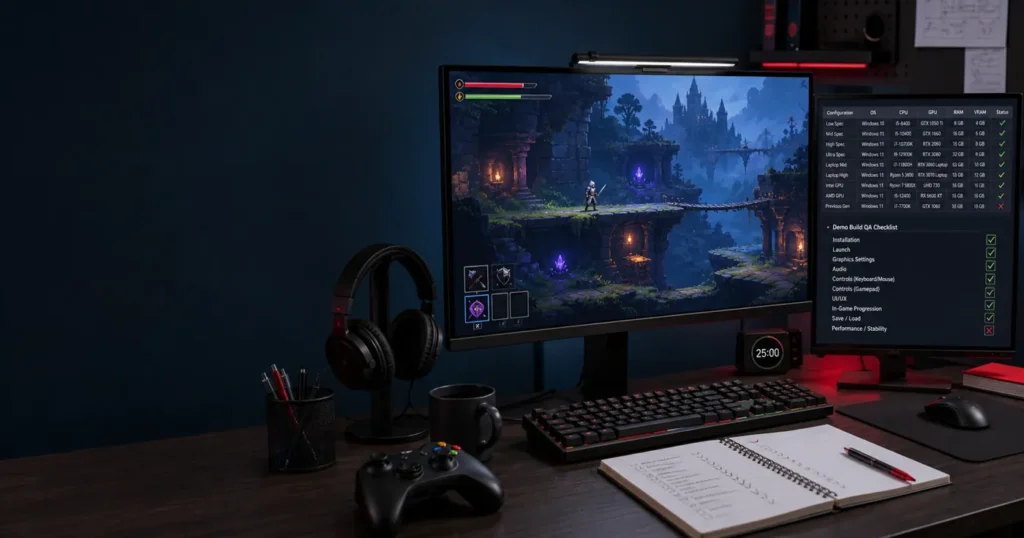
Build a manageable PC game testing matrix from your stated minimum and recommended specifications. Record CPU, GPU, RAM, operating system, driver version, resolution, display mode, and graphics preset for each tested configuration. Choose combinations that represent meaningful risks rather than claiming every possible PC is covered.
Test menu readability, resolution changes, windowed and fullscreen behavior, alt-tab recovery, and audio settings. Repeat a demanding gameplay segment on the selected configurations. Agree on performance targets before measuring; record loading, stutter, frame pacing, and stability observations against those targets.
Check keyboard and mouse throughout the journey. If the demo advertises controller support, include the agreed controller models, button prompts, menu navigation, remapping where available, and disconnect/reconnect behavior. This is input coverage within demo QA, scoped to supported features.
For Unity and Unreal projects, verify the actual shipping build and content package. Missing assets or configuration differences may not appear in the editor. Steam Deck, Linux, macOS, or specialist performance profiling should only appear as tested coverage when those environments and activities are explicitly included.
7. Demo completion, exit, and relaunch
The ending needs its own test cases. Confirm that players reach a clear completion message, understand what is available next, and can leave without a frozen screen or an inaccessible menu. Check that any wishlist or full-game link opens the correct destination.
Close normally from the menu, relaunch, and inspect saved progress and preferences. Where safe in a disposable test profile, also assess recovery from an unexpected process exit. Document the intended save behavior first: some demos resume, others deliberately restart, and neither should make misleading promises.
Test replay after completion and after a demo update. Confirm that locked full-game content stays outside the intended demo boundary. If progress transfer is promised, validate it with the relevant builds and account conditions; do not imply that transfer works merely because both applications use Steam.
8. How independent game QA helps studios prepare
Independent indie game QA gives your team another view of assumptions that become familiar during development. Testers HUB provides game testing services, including PC game testing, with coverage agreed around the build, player journey, configurations, and release timeline.
For a useful engagement, share build access, supported specifications, expected demo length, known issues, and the release candidate schedule. Agree on installation checks, gameplay coverage, fresh-player observation, compatibility, and a fix-verification cycle before work begins.
Request a deliverable that connects each defect to its environment and player impact. The release summary should identify tested and untested areas, remaining blockers, accepted risks, and retest results. The studio keeps the release decision. For budgeting and scope factors, read our Steam demo testing cost guide.
9. Practical Steam demo release-readiness checklist
Use this example QA matrix as a starting point. Add build ID, configuration, actual result, evidence link, owner, and status to each row. Mark each case Pass, Fail, Blocked, Not tested, or Not applicable; an empty cell is not a pass.
| Area | Test scenario | Expected evidence or pass criterion |
|---|---|---|
| Installation | Fresh install through Steam | Demo reaches a usable menu without developer-only dependencies. |
| First play | Uncoached player starts a new game | Player can identify and attempt the first objective; observations recorded. |
| Progression | Complete every required transition | No unresolved blocker on the agreed critical path. |
| Recovery | Die and reload a checkpoint | Required items and objectives remain consistent. |
| Compatibility | Repeat demanding segment on selected PCs | Results meet agreed targets; exact environments recorded. |
| Input | Complete menus and gameplay with supported inputs | Controls and prompts work; reconnect recovers where supported. |
| Demo ending | Complete, exit, and replay | Clear ending, correct links, and expected replay behavior. |
| Final update | Install release candidate and repeat critical path | Fixes verified and affected systems checked for regression. |
Before release, confirm that submission requirements are complete, the intended build is available, blocker decisions are documented, and someone owns incoming issue triage. Prepare a patch verification process so a rushed fix does not bypass the checks that made the original candidate acceptable.
Steam demo testing questions
What should an indie studio test first?
Start with installation, first launch, the first core action, and the path to the demo ending. Then add recovery, compatibility, and supported feature checks based on risk.
Can automated tests replace first-time-player testing?
Automated checks can help repeat stable technical scenarios. They do not establish whether an unfamiliar player understands your tutorial. Combine repeatable checks with observed first play and exploratory game demo testing.
Should QA be repeated after Steam approval?
Yes, whenever you change the approved build. Verify the changes and run a critical-path regression on the release candidate, including install or update and relaunch.
Prepare your Steam demo for real players
Preparing a Steam demo or PC game release? Get independent gameplay, compatibility, and regression testing from Testers HUB. Share your build stage, target specifications, demo length, and deadline so we can recommend a practical scope.