A Shopify store can look ready while a theme change, customer-facing app, promotion, or mobile layout quietly breaks the journey to checkout. This practical Shopify QA testing checklist helps store owners and agencies review the paths that affect customer trust and revenue before launch.
Start With the Customer Journey, Not the Theme Preview
Theme previews rarely represent every real customer state. A useful QA scope follows how a shopper searches, compares, selects a variant, adds a product, applies a promotion, recovers from an error, signs in, and reaches checkout. It also includes the store’s priority devices, browsers, markets, payment methods, and installed apps.
Shopify Store QA Checklist
| Area | Checks to prioritize | Why it matters |
|---|---|---|
| Theme and navigation | Menus, links, templates, responsive states, keyboard operation, focus visibility | Customers must be able to find and reach products consistently. |
| Products and variants | Prices, stock, options, images, quantity, dynamic updates, validation | Incorrect states create confusion and abandoned carts. |
| Cart and promotions | Cart drawer, totals, discount rules, shipping thresholds, upsells, removal | Small logic errors directly affect order value and trust. |
| Checkout entry | Guest and account paths, address errors, payment redirects, confirmations | Release risk is highest where shoppers commit to purchase. |
| Mobile and browsers | Real-device journeys, touch targets, reflow, text scaling, supported browsers | Mobile layouts and browser differences can hide or block actions. |
| Analytics and apps | Events, pixels, reviews, subscriptions, chat, loyalty, cookies, product options | Third-party components can disrupt tracking and customer workflows. |
Add Accessibility Checks to Revenue-Critical Journeys
Shopify publishes accessibility guidance for themes, but it also explains that following individual practices does not guarantee a fully accessible storefront. Custom sections, content, and third-party apps still need review. A focused technical QA scope can use agreed WCAG 2.2 criteria alongside Shopify’s theme accessibility guidance.
- Use menus, filters, product variants, cart controls, and forms with a keyboard.
- Check visible focus, logical focus order, and focus return after drawers or dialogs close.
- Review image alternatives, headings, links, form labels, instructions, and error recovery.
- Validate zoom, reflow, text scaling, touch targets, and representative mobile layouts.
- Include NVDA or VoiceOver only when the assistive technology and journeys are confirmed in scope.
This is technical accessibility QA, not legal advice or formal compliance certification.
Review Third-Party Apps as Part of the Store
An accessible base theme can become difficult to use after apps inject popups, drawers, controls, or dynamic content. Build a small app matrix that records the customer task, device, browser, keyboard behavior, focus behavior, visible result, and evidence for reviews, subscriptions, loyalty, live chat, cookie consent, upsells, size guides, and product options.
Test Before Launch and After High-Risk Changes
Before launch or a major campaign
Run the complete purchase journey, supported device and browser coverage, payment or sandbox states, priority apps, analytics events, and agreed accessibility checks. Leave time for fixes and at least one retest cycle.
After theme, content, or app changes
Use focused regression around the changed component and connected journeys. A new popup, promotion, subscription widget, or product option can affect navigation, cart behavior, focus, tracking, and mobile layouts beyond its own screen.
What a Useful Shopify QA Report Should Include
Developers need more than a list of symptoms. Each finding should identify the page or template, environment, customer task, steps to reproduce, actual and expected result, severity, user impact, screenshots or recordings, and retest status. Accessibility findings should also reference the agreed criterion where relevant.
How to Compare Shopify QA Testing Proposals
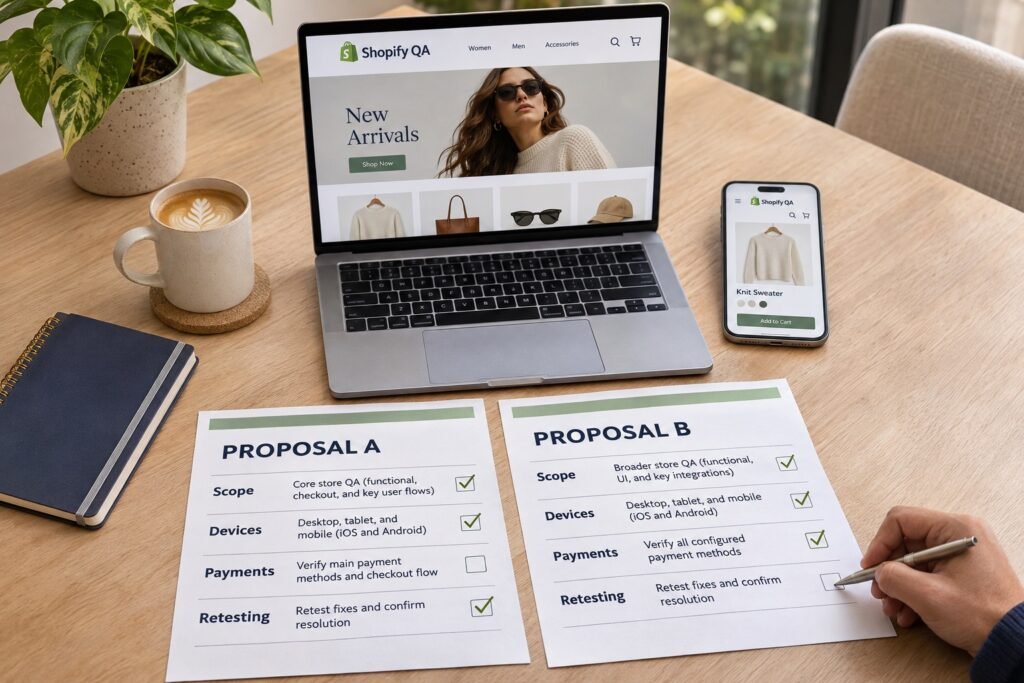
Compare Shopify QA proposals by the journeys, environments, evidence and follow-up they explicitly include. Similar service labels can hide very different coverage: a desktop checkout check is a smaller engagement than real-device testing across selected apps, markets and payment states.
Ask each provider to respond against the same scope. The matrix below is buyer guidance, not a statement that every item is included in a Testers HUB package. Clearly documented exclusions help you compare quotes fairly.
On mobile, swipe the comparison table horizontally to read every column.
| Selection criterion | Evidence to request | Warning sign |
|---|---|---|
| Store and release scope | Theme version, changed templates, product types and customer journeys. | “Complete store testing” without a defined boundary. |
| Browsers and real devices | Named browsers, OS versions, physical devices and representative combinations. | “All devices” without a confirmed matrix. |
| Shopify apps and checkout | Installed apps, checkout configuration, subscriptions and connected workflows. | App interactions omitted without explanation. |
| Payment-test environment | Merchant-approved environment, gateways, test methods and restrictions. | Live transactions or payment-mode changes assumed without approval. |
| Markets and promotions | Supported countries, currencies, discounts, variants, shipping and tax rules. | One happy-path order presented as full coverage. |
| Accessibility | Agreed criteria, journeys and assistive technologies; explicit exclusions. | Unqualified compliance or certification guarantees. |
| Retesting and regression | Separate fix verification and regression scope, cycles and charges. | Unlimited follow-up implied by “testing included.” |
| Evidence and reporting | Sample defect format, environment details and passed, failed, blocked and untested coverage. | Completion confirmed only verbally. |
| Staffing and communication | Assigned capacity, reporting cadence, escalation and developer handoff. | No clear responsibility for questions or blockers. |
| Extra builds and exclusions | Rules for replacement builds, changed scope, additional effort and separately scoped work. | Costs or exclusions left undefined until testing begins. |
Confirm the environment with the merchant before payment testing. Shopify states that customers cannot place live orders while payment providers are in test mode. Its supported test methods also have limitations; a sandbox result does not prove every production payment path. Agree who enables testing, restores settings and manages test orders. See Shopify’s test-order guidance.
Functional QA does not establish peak-traffic capacity, security assurance or accessibility certification. Scope specialist work and development fixes separately. For execution examples, use our checkout testing checklist.
What Should a Store Owner Provide Before Requesting a Shopify QA Quote?
Send the store URL, platform and checkout configuration, theme version, changed apps, priority journeys, supported markets and payment methods, target devices, approved test environment and release date. Include known issues, developer availability and whether the request is for a single release or recurring regression.
Request written coverage, deliverables, exclusions and treatment of additional builds. Agree retesting and regression separately rather than assuming either is bundled. Our eCommerce QA scope, timeline and cost guide explains estimate preparation. For ongoing staffing, review hiring website testers.
Share your store URL, theme or app changes, payment methods, target devices and release date to discuss coverage, deliverables and retesting terms.
Shopify QA Testing FAQs
What should a Shopify store QA checklist include?
It should cover product discovery, search, filters, product variants, cart behavior, checkout entry, payment states, customer accounts, responsive layouts, browser behavior, installed apps, analytics, and agreed accessibility checks.
Can Shopify apps break an otherwise stable store?
Yes. Reviews, subscriptions, loyalty, chat, cookie consent, product options, and promotional apps can change page behavior, focus order, performance, tracking, and purchase journeys.
Should accessibility be tested before every Shopify launch?
Accessibility-sensitive customer journeys should be checked before major theme changes, redesigns, app rollouts, campaigns, and releases. The scope should reflect the parts of the store that changed.
Is an automated accessibility scan enough for Shopify?
No. Scans can identify selected technical patterns, but human testing is needed for keyboard journeys, focus behavior, dynamic variant and cart updates, form recovery, and complete purchase tasks.
Can Testers HUB retest Shopify issues after fixes?
Yes. A retest cycle can verify fixes and run focused regression checks around the affected theme, app, cart, checkout, or customer journey.
What information should I provide when requesting a Shopify testing quote?
Share the store URL, theme or app changes, checkout configuration, payment methods, target markets and devices, approved test environment and release date. Clarify initial testing, fix verification and recurring regression so the proposal can define coverage, exclusions, deliverables and charges.