
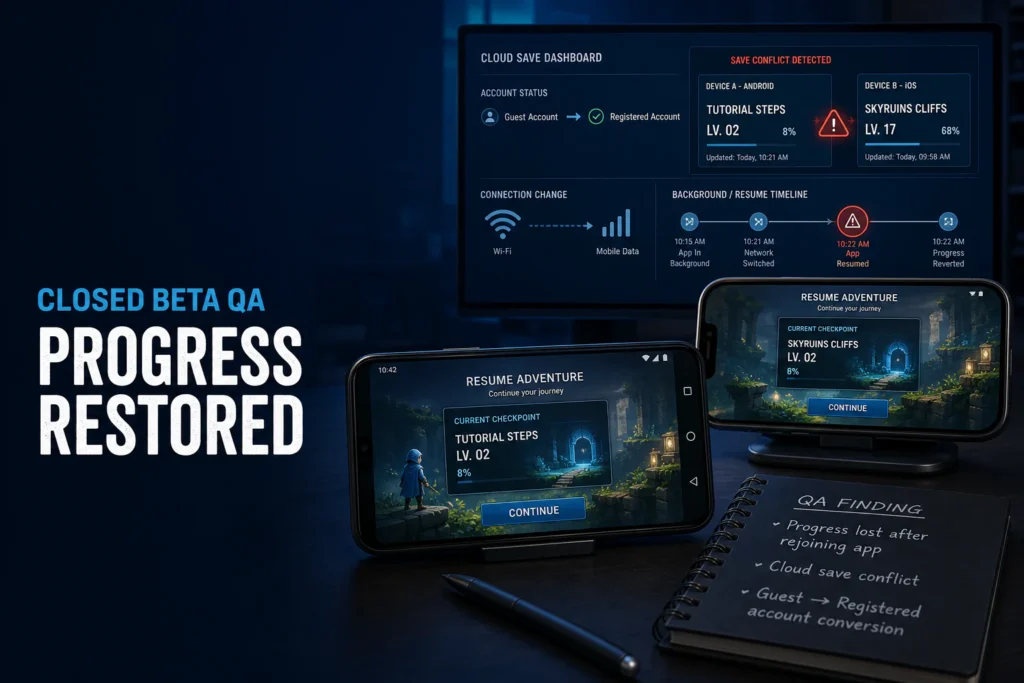
An indie mobile game studio was preparing to expand its closed beta when a small group of players reported a serious problem: after leaving the game and returning later, some of their progress had disappeared.
The reports were difficult to compare. One player had switched from Wi-Fi to mobile data. Another had started as a guest and created an account later. A third had placed the game in the background before reopening it. The development team could see that the players were frustrated, but short internal sessions did not reproduce the loss consistently.
That made the issue especially risky. A crash is visible immediately. A save conflict may remain hidden until a player has invested time, returned to the game, and discovered that completed tutorial steps or level progress no longer exists.
This anonymized case study explains how our mobile game testing services team recreated the affected journeys, connected the failures to cloud-save synchronization, and gave the studio evidence it could use before expanding the beta. Identifying details have been withheld to protect client confidentiality.
Planning a mobile game beta?
Share the build, target devices, account model, save behavior, and beta timeline. We will recommend focused coverage for the player journeys that carry the most release risk.
The Challenge: Progress Was Lost Only After Rejoining
The game used a mix of local and cloud saves. New players could begin as guests, complete the tutorial, unlock early content, and later create an account to keep their progress. Registered players could also continue on another supported device.
In the studio’s normal internal flow, this worked. A tester installed the latest build, completed a short path, closed the app, and reopened it on the same network. The expected checkpoint remained available.
Closed-beta players did not behave that neatly. They played between other tasks, changed networks, allowed the app to sit in the background, returned after several hours, and sometimes converted a guest profile into a registered account during the same period. Those interruptions exposed combinations the internal checks had not covered deeply.
What Players Were Actually Reporting
The initial comments sounded similar, but they did not all describe the same sequence. We separated each report into account state, device state, connection state, and save state.
- A completed tutorial appeared incomplete after the app resumed.
- A later level checkpoint was replaced by an older checkpoint.
- Guest progress changed after the player created an account.
- A reconnect after temporary offline play produced an unexpected save.
- The problem appeared after backgrounding or reopening, not during continuous play.
That distinction shaped the investigation. We were not looking for a general gameplay defect. We were testing how multiple valid player states competed when the game reconnected.
Why the Bug Was Difficult to Reproduce Internally
The development team knew the intended save logic, so its test path naturally followed the expected sequence. In addition, most internal sessions were short, connected, and completed on a stable office network.
Beta players created less predictable conditions. They moved the app between foreground and background, returned on a different connection, and expected the latest successful progress to survive. Familiarity with the intended workflow had hidden the interruption risk.
This is one reason external QA can help an indie studio. Fresh testers do not begin with the same assumptions. They can deliberately break a journey into state changes and observe what the player receives rather than what the system was designed to return.
Our Mobile Game Beta Testing Approach
We built a focused matrix around the conditions found in the beta reports. Instead of testing every feature equally, we prioritized save integrity and the journeys that could change local or remote progress.
1. Establishing Known Progress States
Each test began from a documented checkpoint. We recorded the account type, tutorial status, unlocked content, local save state, cloud save state, device, OS, build, and connection. This gave the team a reliable before-and-after comparison.
2. Background and Resume Testing
We backgrounded the game at different points: after earning a reward, during a transition, after completing a level, and after the save indicator appeared. We then resumed quickly, after a longer wait, and after the operating system had reclaimed more resources.
3. Wi-Fi, Mobile Data, and Offline Recovery
Next, we changed the network between the save and the return journey. The matrix included Wi-Fi to mobile data, temporary loss of connectivity, offline progress followed by reconnection, and a reconnect while the app was resuming.
4. Guest-to-Account Conversion
Guest conversion needed separate attention because two identities could be involved: the local guest profile and the new registered account. We checked which progress moved, what happened when a remote profile already existed, and whether the player received a clear conflict decision.
5. Cross-Device Save Checks
Where the agreed scope supported it, we also compared progress across selected Android and iOS devices. The goal was not a large device count. It was to prove that the save rules remained consistent when another device introduced a newer remote state.
Need independent game QA for a beta or launch?
Our team can test gameplay, accounts, cloud saves, devices, interruptions, monetization, and regression without turning a focused beta into an oversized test plan.
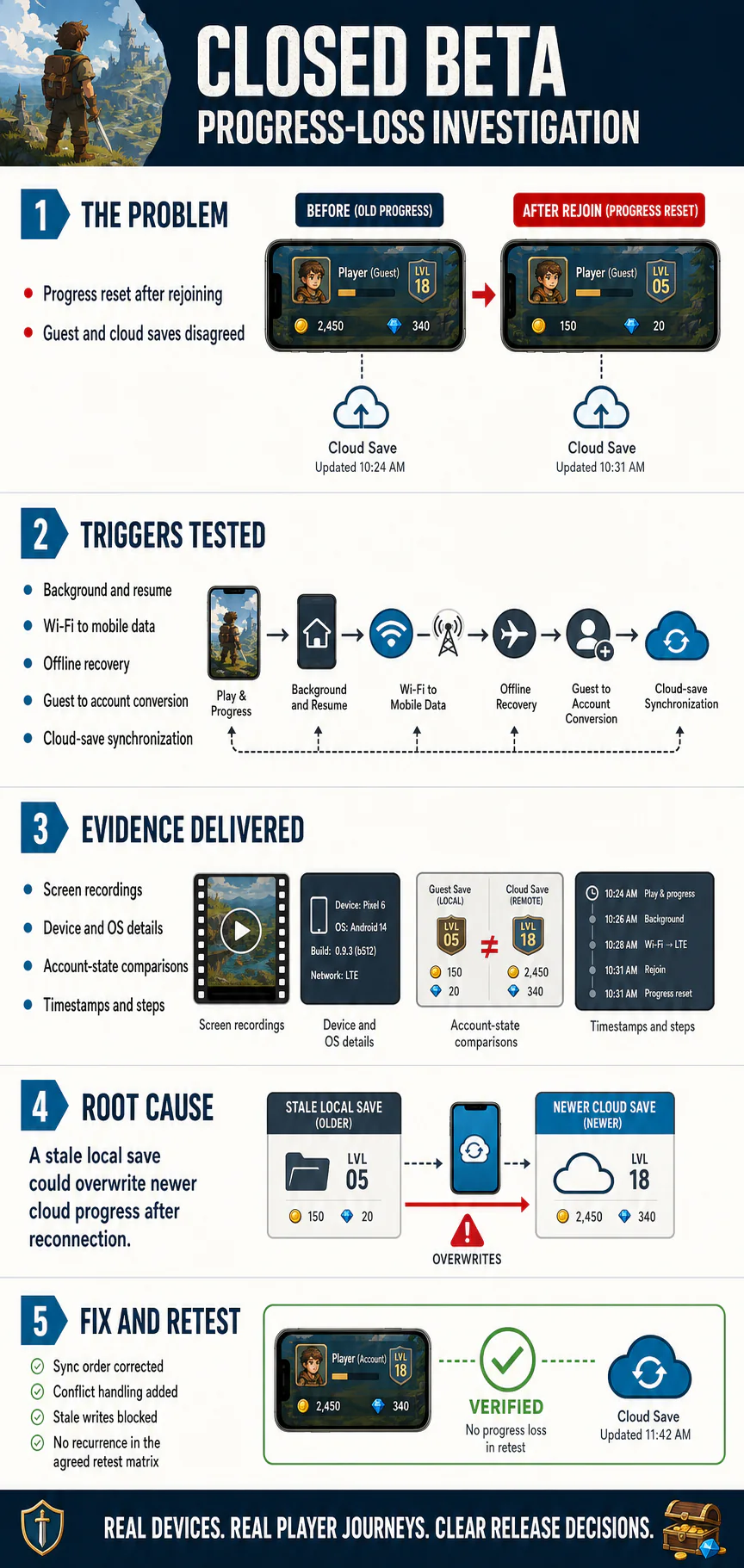
The Reproducible Sequence We Found
The most useful result was not simply that progress could disappear. It was a repeatable sequence that showed when the wrong state won.
- A guest player completed the tutorial and reached a later checkpoint.
- The game recorded newer progress locally while the cloud update was delayed.
- The player placed the app in the background and changed networks.
- The player returned and completed guest-to-account conversion.
- The app refreshed the remote state while a stale local write was still eligible.
- The older local snapshot replaced the newer cloud progress.
Not every player needed to perform those actions at the same speed. Timing and connection quality changed the likelihood. However, once the state sequence was controlled, the team could reproduce the loss and inspect the synchronization path.
Evidence Delivered to the Development Team
A cloud-save issue can become difficult to discuss when the report only says, “My progress is gone.” We therefore delivered evidence that aligned the player’s actions with the system state.
- Screen recordings from the known checkpoint through the failed return
- Device, OS, build, account type, and network details
- Local and remote progress comparisons before and after the event
- Timestamps for save, background, reconnect, account conversion, and rejoin
- Exact reproduction steps and the conditions that did not reproduce the issue
- Severity notes based on player impact and recoverability
- A regression matrix for validating the corrected behavior
This evidence helped the development team narrow its investigation without treating every save-related support message as a separate bug.
The Root Cause: A Stale Local Save Could Win
The final technical diagnosis belonged to the development team. Based on the reproduced sequence and their review, the problem was traced to the order in which local and cloud states were reconciled after reconnection.
A stale local snapshot could remain eligible to write after a newer cloud state had become available. During a specific resume and account-conversion sequence, the application did not resolve that conflict correctly. As a result, the older progress could overwrite the player’s latest checkpoint.
The bug was therefore not a simple failure to save. Both saves existed. The problem was deciding which state should be trusted when the player returned.
Fix and Regression Coverage
The studio adjusted the synchronization sequence and conflict rules. The updated build prevented stale local writes from replacing a newer cloud state and handled guest conversion more deliberately. The player-facing recovery behavior was also made clearer when the game could not confirm a save immediately.
Our regression pass repeated the original failure sequence and nearby variations:
- Background and resume before and after a checkpoint
- Wi-Fi to mobile data and temporary offline recovery
- Guest play followed by account creation
- Existing account with newer remote progress
- App restart during delayed synchronization
- Selected Android and iOS device combinations
The progress-loss issue did not recur across the agreed retest matrix. That result gave the studio a clearer basis for expanding the beta, while monitoring and support notes remained in place for real-world feedback.
What Indie Game Studios Can Learn From This
Save integrity deserves its own beta plan. A basic reopen check is not enough when a game supports guest play, cloud saves, multiple devices, offline progress, or account conversion.
Testing should cover the moments between normal actions: the network change after a checkpoint, the app resume before a sync completes, and the identity change between a guest and a registered player. Those transitions often carry more risk than the happy path itself.
Studios do not always need a large permanent QA team. A focused external pass at the right milestone can challenge assumptions and document the release-critical journeys. Our guide on when an indie game studio should bring in external QA explains how coverage can change from alpha through post-launch updates.
For a defined release, compare our game testing packages. For ongoing beta builds and regression, you can also hire game QA testers or review our approach to outsourcing game QA services.
Protect player progress before the next beta build
Tell us how accounts, checkpoints, devices, and cloud saves work in your game. We will help turn those flows into a practical beta QA scope.
FAQs
What should mobile game beta testing cover?
Mobile game beta testing should cover complete player journeys, account states, save and restore behavior, background and resume events, network changes, real-device compatibility, monetization, notifications, performance, and regression around release-critical flows.
Why can game progress disappear after an app resumes?
Progress can disappear when local and cloud saves are updated in the wrong order, a stale local state overwrites a newer remote state, or reconnection logic does not resolve conflicting timestamps and account states correctly.
Should an indie studio use external game QA before a closed beta?
External game QA is useful when a build needs fresh player journeys, broader devices, interrupted sessions, account conversion, or cloud-save checks that internal teams may not exercise consistently while developing the game.
How do testers validate cloud saves in a mobile game?
Testers compare local and remote progress across sign-in states, devices, app restarts, network changes, offline recovery, guest-to-account conversion, and conflicting save timestamps. They then document which state wins and whether the result matches the intended rules.
How many devices are needed for mobile game beta testing?
There is no useful universal number. The device matrix should represent the game’s target players, operating-system range, hardware tiers, screen sizes, and known risk areas rather than chasing a large device count without clear coverage goals.
What evidence should a game QA bug report include?
A useful report includes the build, device and OS, account state, network state, starting progress, exact steps, timestamps, expected and actual results, video or screenshots, severity, and retest notes.