How Real Device Testing Helped a Startup Fix Android App Crashes Before Launch
Launching a mobile app sounds exciting until real users start reporting crashes that never appeared during internal testing.
Recently, a startup approached Testers HUB after facing stability concerns during their final pre-launch phase. Internally, the application appeared stable. The development team had already tested the app on a few flagship devices, and everything looked ready for release.
However, during beta access, a small number of users started reporting random crashes on Android devices.
The issue was inconsistent.
Some users experienced crashes during login, while others reported the app freezing while switching screens. Since the development team could not reproduce the problem consistently, they needed external mobile app testing support across real devices.
That’s where our team stepped in.
Project Overview
The client was an early-stage startup preparing to launch a productivity-based mobile application for Android and iOS users.
The app included:
- User login and authentication
- Real-time dashboard updates
- Push notifications
- File uploads
- Multi-screen navigation
Although the app worked smoothly internally, the startup wanted additional real-device testing before starting paid marketing campaigns.
Main Challenges Reported by the Client
The startup team faced several concerns:
- Random crashes reported by beta users
- UI freezes during screen transitions
- App lag on older Android phones
- Push notifications occasionally failing
- Different behavior across devices
Most importantly, the issue was not reproducible on high-end developer devices.
As a result, the client wanted testing support on multiple Android devices with different RAM capacities, Android versions, and network conditions.
Testing Scope Covered by Testers HUB
Our team performed comprehensive mobile app testing services focused on real-world user conditions.
The scope included:
- Functional testing
- Android app testing
- Real device testing
- Regression testing
- Compatibility testing
- Network condition testing
- UI/UX validation
- Push notification testing
Additionally, we simulated unstable internet conditions and low-memory device behavior to reproduce the issue accurately.
Devices & Platforms Tested
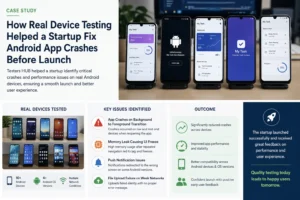
To identify the root cause, we tested the application across multiple Android devices and OS versions.
Devices Included
- Samsung Galaxy A Series
- Redmi Note Series
- Motorola G Series
- OnePlus Devices
- Google Pixel Devices
Android Versions Tested
- Android 11
- Android 12
- Android 13
- Android 14
- Android 15
- Android 16
We also tested the app under:
- Low battery conditions
- Background app load
- Weak network connectivity
- Mid-range RAM usage scenarios
This helped reproduce the exact conditions real users were facing.
Need Real Device Testing Across Android Phones?
We test applications under real-world user conditions.
Critical Issues Identified
During testing, our QA team identified several important issues that had been missed during internal QA.
1. Crash During Background-to-Foreground Transition
The app crashed when users reopened the application after receiving push notifications while multiple apps were running in the background.
This issue mainly affected mid-range Android devices with lower available memory.
2. Memory Leak Causing UI Freeze
After repeated screen navigation, memory usage increased significantly, eventually causing lag and temporary freezes.
The issue became visible after extended sessions on older devices.
3. Push Notification Redirection Failure
On specific Android versions, tapping notifications redirected users to incorrect screens.
This created onboarding confusion during testing.
4. File Upload Failure on Weak Networks
File uploads occasionally failed silently under unstable internet conditions.
Users received no proper error message, which could have resulted in poor user experience after launch.
How We Helped the Client
Our team documented:
- exact reproduction steps
- screen recordings
- logs
- affected devices
- network conditions
- frequency of occurrence
This helped the development team reproduce and fix the issues much faster.
We also performed regression testing after fixes to ensure stability across devices.
Final Outcome
After implementing fixes, the startup achieved:
- significantly reduced crashes
- smoother app performance
- stable onboarding experience
- improved push notification behavior
- better compatibility across Android devices
Most importantly, the client launched with greater confidence before starting their user acquisition campaigns.
Within weeks of release, the app received positive early feedback regarding performance and usability.
Why Real Device Testing Was Important
One of the biggest lessons from this project was simple:
Internal testing environments rarely reflect real-world user behavior.
Many mobile apps work perfectly on flagship devices but fail on:
- low-memory phones
- older Android versions
- unstable networks
- real user usage patterns
That’s why real device testing plays a critical role before launch.
Need Similar Mobile App Testing Support?
If your application works internally but you are unsure how it performs for real users, professional QA testing can help identify hidden issues before launch.
Testers HUB provides:
- Mobile App Testing Services
- Android App Testing
- iOS App Testing
- Real Device Testing
- Startup MVP Testing
- Performance & Compatibility Testing
Launching Your Mobile App Soon?
Find hidden crashes and compatibility issues before your users do.
FAQ
Why do apps crash only on some Android devices?
Different Android devices have varying RAM capacity, OS behavior, hardware performance, and background memory handling. Real device testing helps identify such device-specific issues.
Why is real device testing important before launch?
Real device testing helps simulate actual user conditions, including low memory, unstable networks, and device fragmentation that emulators often miss.
What types of apps can benefit from mobile app testing services?
Startups, SaaS platforms, ecommerce apps, healthcare apps, fintech apps, and gaming applications can all benefit from professional QA testing.
Does Testers HUB test apps on real Android devices?
Yes. Testers HUB performs testing across multiple real Android and iOS devices to identify compatibility and usability issues.
Can you help startups before app launch?
Yes. We regularly support startups with pre-launch testing, regression testing, usability validation, and real-device QA testing.
Looking to Improve App Stability Before Launch?
Get expert QA support for startups, SaaS products, and mobile apps.