
Hundreds of Players Were Finishing Puzzles Without Problems. Then We Found a Crash Nobody Could Explain.
A US-based puzzle game studio contacted us after noticing something strange inside their crash analytics dashboard.
The game wasn’t crashing frequently.
In fact, most players never experienced any problems at all.
Daily active users were growing.
Player reviews were positive.
Retention numbers looked healthy.
From the outside, everything appeared stable.
Yet every few days, new crash reports continued appearing.
Not hundreds.
Not thousands.
Just enough to become concerning.
The development team had already conducted an internal investigation.
They reviewed logs.
Tested multiple devices.
Ran regression cycles.
Nothing obvious stood out.
What made the situation particularly frustrating was that no one within the company could consistently reproduce the issue.
The bug existed.
Players were reporting it.
Crash analytics confirmed it.
But every time developers tried to recreate the problem, the game behaved perfectly.
At that point, the studio decided to bring in external mobile game testing services to investigate.
Players Reporting Crashes You Can’t Reproduce?
Our mobile game testing team specializes in finding device-specific issues before they impact player retention.
What Players Were Actually Reporting
The reports didn’t immediately look connected.
One player wrote:
“The game closes when I use hints.”
Another reported:
“Puzzle crashes randomly.”
A third player simply stated:
“Game exits during gameplay.”
The descriptions felt vague.
Some users blamed their phones.
Others blamed the latest update.
Initially, it looked like several unrelated issues.
However, after reviewing dozens of reports, we noticed something interesting.
Many affected users owned the same device family.
The Clue Hidden Inside the Crash Reports
When our game QA testing team started reviewing analytics, device information quickly became the focus.
We exported crash reports and started grouping them by:
- device model
- Android version
- game version
- gameplay stage
One pattern immediately stood out.
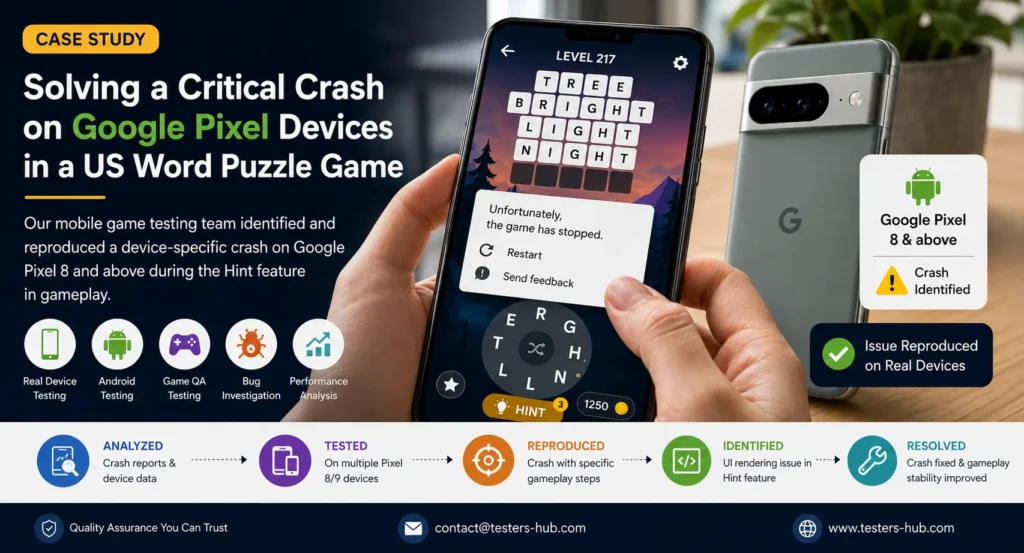
A surprisingly high percentage of affected users were playing on:
Google Pixel Devices
More specifically:
- Google Pixel 8
- Google Pixel 8 Pro
- Google Pixel 9 Series
The more reports we reviewed, the clearer the pattern became.
This wasn’t a random Android issue.
This wasn’t a server issue.
Something was happening specifically on newer Pixel devices.
That discovery changed the entire investigation.
Why Internal Testing Never Found It
One thing many studios underestimate is how difficult it can be to reproduce device-specific issues.
The development team had tested:
- Samsung devices
- Motorola devices
- OnePlus devices
- Xiaomi devices
The game worked perfectly.
Even on Pixel devices, the crash didn’t happen immediately.
A tester could complete multiple levels without seeing any problems.
This explains why the issue survived previous QA cycles.
The crash required a very specific combination of actions before it appeared.
Looking to Hire Game Testers?
Validate gameplay, performance, stability, and compatibility across real Android and iOS devices.
Three Days Later, We Finally Triggered It
For almost three days, our mobile game testing team couldn’t reproduce anything.
The game felt stable.
Levels loaded normally.
Achievements worked.
Rewards worked.
Hints appeared correctly.
Then one of our testers accidentally triggered the exact sequence.
It happened while testing a difficult puzzle level.
The tester:
- entered a puzzle
- solved several words
- opened the Hint feature
- used multiple hints consecutively
- continued gameplay
The game instantly crashed.
No warning, no freeze or no error message.
Just closed.
At first, we assumed it was a coincidence.
So we repeated the same sequence.
Crash.
Another Pixel 8 device.
Crash again.
Pixel 8 Pro.
Same result.
For the first time, the studio finally had a reproducible scenario.
What We Actually Found
After deeper investigation, we discovered the problem wasn’t caused by gameplay logic.
The puzzle system itself was working correctly.
The issue was connected to the Hint feature.
Specifically, newer Google Pixel devices were handling a certain UI rendering process differently when hint animations were repeatedly triggered during active gameplay.
Under specific conditions:
- Gameplay state changed
- Hint animation executed
- UI refreshed
- Memory allocation behaved unexpectedly
Eventually, the game attempted to access an invalid UI state, causing an immediate crash.
Because the issue depended on:
- Device type
- Android version
- Gameplay progress
- Repeated hint usage
It remained hidden during previous testing cycles.
Additional Issues We Found Along the Way
While investigating the crash, our game testers identified several smaller issues that had never been reported.
Hint Animation Performance Drops
Longer gameplay sessions occasionally caused minor FPS drops after repeated use of hints.
Achievement Screen Layout Issues
Certain Pixel devices displayed alignment problems on reward screens.
Delayed Reward Updates
Some players experienced slight delays before completed challenges appeared inside progression systems.
Increased Battery Consumption
Extended gameplay sessions showed higher battery usage when visual hint effects were repeatedly activated.
How We Helped the Studio Fix It
Once the crash became reproducible, progress moved quickly.
Our game QA testing team provided:
- Exact reproduction steps
- Video recordings
- Affected device information
- Android version details
- Crash logs
- Technical observations
Instead of searching blindly through thousands of log entries, developers could focus directly on the affected workflow.
The difference was immediate.
What had remained unresolved for weeks became understandable within days.
What Happened After The Fix
Following the implementation of the fix, the studio released a new update.
Post-release monitoring showed:
- significant reduction in Pixel-related crashes
- improved gameplay stability
- smoother Hint functionality
- fewer support tickets
- improved player reviews
Most importantly, players who previously couldn’t complete puzzle sessions without crashing were able to continue playing normally.
Launching a New Game Update?
Identify hidden crashes before your players discover them.
Why Real Device Testing Still Matters
This project reinforced something we regularly see during mobile game testing.
Most crashes don’t happen on every device.
The most expensive bugs are often:
- device-specific
- version-specific
- workflow-specific
They’re difficult to reproduce and easy to miss.
That’s why many studios choose to hire game testers before major launches and updates.
Real-device game QA testing often reveals issues that emulators and limited internal testing never expose.
Need Help Investigating Mobile Game Crashes?
If your studio is receiving crash reports that nobody can reproduce internally, external game testing services can help uncover the root cause faster.
Testers HUB Provides
- Mobile Game Testing Services
- Game QA Testing
- Android Game Testing
- Real Device Testing
- Compatibility Testing
- Performance Testing
- Hire Game Testers Support
Frequently Asked Questions
Why was the game crashing only on Google Pixel devices?
The issue was linked to how certain Google Pixel devices handled the Hint feature during gameplay, resulting in a device-specific crash.
How did Testers HUB identify the crash?
Our mobile game testing team analysed crash reports, tested affected devices, and reproduced the issue using real-device testing.
Why is real device testing important for mobile games?
Real device testing helps uncover bugs that may only appear on specific devices, Android versions, or gameplay scenarios.
Can game QA testing help reduce player churn?
Yes. Identifying crashes, performance issues, and gameplay bugs before release helps improve player experience and retention.
Do you provide mobile game testing services for Android and iOS games?
Yes. Testers HUB provides mobile game testing, game QA testing, compatibility testing, and real-device testing for both Android and iOS games.