Introduction: One App, Many Platforms — A QA Challenge
In 2025, the mobile world is more diverse than ever. Startups and enterprises are building apps not just for one OS but for multiple platforms simultaneously. Frameworks like Flutter, React Native, and Swift make this possible — delivering near-native performance with faster release cycles.
However, faster development doesn’t mean fewer bugs. Cross-platform frameworks often face inconsistent UI behavior, API glitches, and performance drops on certain devices. That’s why mobile app testing services play a vital role in ensuring every build — no matter the framework — performs flawlessly before it hits the stores.
Whether your app is coded in Flutter, React Native, or Swift, a strong QA approach ensures consistent performance, stable integrations, and an enjoyable user experience on every device.
👉 Need end-to-end testing for your hybrid or native app?
⚙️ 1. Understanding the Frameworks Before Testing
Before running a single test, QA engineers must understand how these frameworks behave under the hood.
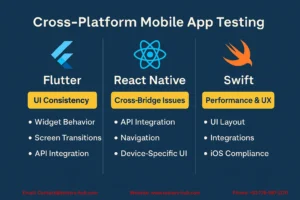
- Flutter uses a single Dart codebase and its own rendering engine, allowing a consistent UI across Android and iOS — but it needs deeper rendering and animation testing.
- React Native connects JavaScript to native APIs, which means issues may appear in communication bridges or during device-specific interactions.
- Swift is Apple’s native language for iOS, offering top-tier performance but requiring detailed testing for App Store compliance, device fragmentation, and version compatibility.
Recognizing these technical differences helps testers design smarter test cases and choose the right combination of manual and automated QA.
🧩 2. Flutter App Testing: Ensuring Pixel-Perfect UI and Stable Logic
Flutter’s main strength — its beautiful and responsive UI — is also its biggest testing challenge. Since it renders UI components directly using its engine, even small visual issues can impact user perception.
🔍 What to Test in Flutter Apps
- Widget behavior and animation consistency
- Screen transitions and layout scaling on tablets and phones
- Integration with APIs and Firebase services
- Offline and network recovery scenarios
- Platform-specific features like camera, GPS, or permissions
🧠 Best Practices
- Use Flutter’s Widget Testing and Integration Test libraries.
- Execute regression tests after every UI change since visual components are closely linked.
- Run tests on both iOS and Android simulators and real devices to catch rendering differences.
By combining automated Flutter test scripts with real-device validation, QA teams can ensure both stability and aesthetic consistency across platforms.
⚛️ 3. React Native App Testing: Managing Cross-Bridge Behavior
React Native allows developers to reuse up to 90% of code between Android and iOS — but its JavaScript bridge introduces unique QA challenges. Delays, dropped frames, or inconsistent UI rendering often occur when the bridge isn’t optimized.
🔍 What to Focus On
- API integration between JavaScript and native modules
- State management issues during navigation
- Device-specific rendering differences
- Push notifications and deep linking
- Memory leaks during background-foreground transitions
🧠 QA Tips for React Native Apps
- Use testing libraries like Detox, Appium, and Jest for functional and end-to-end tests.
- Perform manual exploratory testing for gestures, animations, and app lifecycle events.
- Conduct performance benchmarking for different devices to identify sluggish components early.
Through structured React Native app testing, teams can balance shared code efficiency with native-level quality.
🍎 4. Swift App Testing: The Native iOS Advantage
When it comes to Apple devices, Swift powers most modern apps. Because Swift interacts directly with Apple’s frameworks, it demands precise testing for security, usability, and OS version compatibility.
🔍 Areas to Cover
- UI layout validation across iPhones, iPads, and newer models
- Integration with iCloud, HealthKit, and Apple Pay
- Compliance with Apple’s Human Interface Guidelines
- Localization and accessibility testing for global users
🧠 Best Practices
- Automate tests with XCTest or Appium for iOS.
- Validate app behavior on real devices running multiple iOS versions.
- Conduct load and crash testing during high user activity to ensure long-term stability.
By focusing on both functionality and Apple’s UX expectations, Swift app testing guarantees smooth performance and faster App Store approvals.
🔄 5. Common QA Challenges Across All Frameworks
Despite their technical differences, Flutter, React Native, and Swift apps often share the same QA pain points:
- Device fragmentation: hundreds of devices, screen sizes, and OS versions.
- Third-party integrations: unstable APIs and SDK conflicts.
- Performance issues: frame drops or UI lag in complex animations.
- Security flaws: unsafe data storage or weak encryption.
- Store compliance errors: missed guidelines leading to app rejections.
Effective mobile QA services focus on proactive testing — catching these problems early to save time, cost, and reputation.
📲 6. The Role of Real-Device Testing and Automation
Real users don’t run apps on emulators — they use real devices with different network speeds, memory capacities, and operating systems. That’s why real-device testing is the backbone of quality assurance.
At Testers HUB, we combine real-device coverage with automated testing suites for repeatable test cycles.
Automation tools such as Appium, Espresso, XCTest, and Flutter Driver help validate:
- Cross-platform UI consistency
- API and backend stability
- Regression scenarios after updates
- Load handling and response time
This hybrid approach ensures faster releases while keeping accuracy uncompromised.
🚀 7. How Testers HUB Ensures Cross-Platform Quality
As a trusted mobile app testing company, Testers HUB focuses on testing apps built across Flutter, React Native, and Swift environments for global startups and enterprises.
We ensure:
- ✅ Pixel-perfect UI across devices
- ✅ Real-time API validation
- ✅ Security and compliance testing
- ✅ Automated regression cycles
- ✅ Crash and performance analytics
Our team tests on 25+ real devices, ensuring reliable results for users in the USA, UK, UAE, Australia, and beyond.
👉 Want your next release to run smoothly across all devices?
💡 Conclusion: Framework Doesn’t Matter, Quality Does
In the end, users don’t care what framework you used — they care how well your app works. Whether it’s Flutter’s dynamic UI, React Native’s hybrid strength, or Swift’s iOS precision, every app needs a solid QA foundation to succeed.
By investing in cross-platform mobile app testing services, you guarantee that your app performs consistently, loads quickly, and delights users — no matter the device, OS, or framework.
❓ FAQ – Flutter, React Native, and Swift App Testing
Q1. Why do hybrid apps need specialized testing?
Because they run on multiple platforms, hybrid apps require additional validation for UI rendering, API integration, and device compatibility.
Q2. What tools are used for Flutter and React Native app testing?
Common tools include Appium, Detox, Espresso, and Flutter Integration Test.
Q3. How often should mobile apps be tested?
Testing should occur before each release, major update, and API integration.
Q4. Can automation replace manual testing?
No — automation saves time but manual testing catches usability and UI issues automation can’t detect.
Q5. How does Testers HUB handle real-device testing?
Our QA team tests apps across 25+ real devices covering Android and iOS versions for maximum reliability.