(US-Based Mobile App Startup Case Study)
For many startups, launching a mobile app feels like crossing the finish line. The features are complete, the design looks polished, and internal testing appears “good enough.” However, what often gets overlooked is how differently an app behaves once it reaches real users, real devices, and real networks.
This case study explains how a US-based mobile startup avoided a failed App Store launch by applying a structured pre-launch mobile app testing checklist just days before release.
The Situation: A Confident Team With Hidden Risks
The startup was preparing to launch a consumer-facing mobile app on both iOS and Android. Internal QA had already validated core features, and the release timeline was locked. Early beta feedback was limited but positive, which gave the team confidence to proceed.
However, during final internal reviews, the team noticed inconsistent behavior on a few Android devices. While these issues didn’t block basic usage, they raised concerns about what might happen once thousands of users downloaded the app across different devices.
At that point, the team decided to run a final pre-launch QA cycle using a structured testing checklist rather than relying on assumptions.
Phase 1: Testing the App as a First-Time User
Instead of repeating scripted test cases, the QA team tested the app from a first-time user’s perspective.
This phase focused on:
- Installing the app from scratch
- Completing onboarding and account creation
- Navigating key screens without guidance
- Handling unexpected actions or incorrect inputs
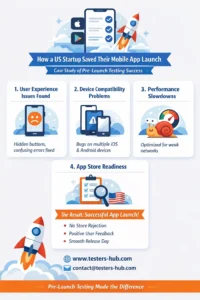
This immediately exposed onboarding crashes on specific Android models. These issues had not appeared on the development team’s primary test devices and would have impacted new users on day one.
Phase 2: Usability Gaps That Internal Testing Missed
While functionality largely worked, usability testing revealed friction points that internal teams had grown accustomed to.
Examples included:
- Primary buttons partially hidden on smaller screens
- Important actions placed too low on the screen
- Error messages that didn’t clearly explain what went wrong
Individually, these were minor issues. Collectively, they would have led to frustration, poor reviews, and early uninstalls.
By resolving these usability gaps, the team significantly improved the first-use experience.
Phase 3: Compatibility Issues Across Devices and OS Versions
The next phase expanded testing across a wider device matrix.
The QA team validated:
- Multiple iOS and Android devices
- Different screen sizes and resolutions
- Supported OS versions
- Orientation changes
- Device-specific hardware behavior
This surfaced layout inconsistencies and broken flows that appeared only on certain device–OS combinations. Without this checklist-driven compatibility testing, a large segment of users would have experienced issues immediately after launch.
Phase 4: Performance Under Real-World Conditions
Internal testing had mostly been done on stable Wi-Fi networks. Performance testing added a more realistic perspective.
Under slower networks and background app conditions, testers observed:
- Delayed screen loads
- Sluggish transitions
- Inconsistent API responses
After performance optimizations, the app felt noticeably faster and more stable—especially on mid-range devices.
Phase 5: App Store Readiness and Final Validation
Before submission, the checklist shifted focus to store-specific requirements and release readiness.
This phase included:
- Verifying permissions and usage explanations
- Reviewing privacy policy links
- Testing the actual release build
- Running a final regression pass to ensure fixes didn’t introduce new issues
This final validation helped the team avoid common App Store and Play Store rejection reasons.
The Outcome: A Smooth Launch Instead of a Costly Setback
After completing the checklist-driven testing cycle, the app was submitted with confidence.
The result:
- No App Store or Play Store rejection
- No critical issues reported during the launch window
- Positive early user feedback
- No emergency hotfixes required after release
What could have become a failed launch turned into a smooth market entry—simply because the team validated the app properly before release.
Why This Checklist-Based Approach Works
This case highlights why structured mobile app testing services are critical before launch. Internal testing alone rarely reflects real-world usage, device diversity, or network conditions.
Dedicated iOS app testing services help ensure App Store compliance, consistent behavior across Apple devices, and smooth user experience. Meanwhile, Android app testing services focus on device fragmentation, OS variations, and hardware-specific behavior that commonly cause post-launch issues.
By applying a checklist-driven QA approach, teams reduce risk, protect early reviews, and launch with confidence.
Frequently Asked Questions
When should teams use a pre-launch mobile app testing checklist?
A checklist should be applied once development is complete and before submitting the release build. It helps identify issues that internal testing often overlooks.
Are mobile app testing services necessary if internal testing is already done?
Yes. Professional mobile app testing services validate real-world scenarios, multiple devices, and edge cases beyond expected internal workflows.
Do iOS and Android apps require different testing approaches?
They do. iOS app testing services emphasize App Store guidelines and device consistency, while Android app testing services focus on OS fragmentation and device diversity.
How long does pre-launch testing usually take?
The timeline depends on app complexity, device coverage, and scope. It typically ranges from a few days to a few weeks.
Can this checklist approach be used after launch?
Yes. The same principles apply to major updates, new features, and regression testing after release.
Planning Your Own App Launch?
If you’re preparing to release a mobile app or planning a major update, a structured QA approach can help you avoid launch-day surprises.